
Blog
Keep visiting this page to view the latest posts!
Follow Me on Twitter
I am now on Twitter! I think this will be a great tool for all of us. I have fun "tweeting" and will be sharing my posts, but also independent blogging tips, search engine optimization (SEO) tips, image editing info, HTML help, and more. So come follow me:...
Custom About Page in Typepad
Many people don't like the new Profile look of the sidebar item with the New Typepad, so a few people have asked me how to create their own page. There are two different ways of doing this; one with a "page" and another by using a Notes typelist....
Custom About Page in Blogger
A few people have asked me about how to make their own "About Me" sidebar item or an "About Me" page in Blogger instead of using the default "About Me" gadget. So I thought I'd share the instructions with all of...

For SU Demos: Creating a link to your personal DBWS website (online store)
This week Stmapin' Up! is having HUGE savings, its Holiday Extravaganza Sale! Many demonstrators have contacted me about how to add a link to their personal, DBWS online store (so customers don't have to later select them as their demonstrator and save...

Holiday Helper Help
Every year Stampin' Up! demonstrator Debbie McNeill of CraftyPerson Production, along with many featured artists, put together this wonderful service for us, as Stampin' Up! demonstrators to share with our customers. It is 12 newsletters to be delivered...
Why My Blog Stats Do Not Match My Counter
This has been a popular question lately, especially due to the "New Typepad" being released and being able to more easily and quickly view stats on your blog. So, the answer is that when the counte rwas put on your blog (using HTML code from your source,...

Domain Forwarding without the "www" Prefix in Blogger
Here is my original tutorial on domain mapping with Go Daddy. Although if you need help with domain mapping and another registrant, just let me know. https://www.blogsbyheather.com/2009/02/domain-mapping-with-blogger-and-go-daddy.html In short, basically you are...
Domain Forwarding without the "www" Prefix in Typepad
Here is my original tutorial on domain mapping with Go Daddy. Although if you need help with domain mapping and another registrant, just let me know. https://www.blogsbyheather.com/2008/08/typepad-domain.html In short, basically you are modifying the CNAME record...
For SU Demos: Build-a-Bear and Big Shot Links Have CHANGED
Last month I posted an image and HTML code for the new Stampin' Up! and Build-a-Bear partnership. However, this month Stampin' Up! changed the "link" on the SU website for the Build-a-Bear information is. I checked other links and the...
Changing to the New Typepad
Like me, many of you many have logged into your Typepad account and see that it looks different. This is the New Typepad. So to familiarize you with the New Typepad layout, here are some quick tips: The File Manager that was in the Control...

Search Engine Optimization
I've had a few customers request information on how to get themselves to rank hire on search engines, such as google. A fellow business associate, Dan Bower from Bower Web Solutions, is in the website development and design business and I am...
How to Add a Banner to Your Blog
I just realized I never provided a tutorial for this! I have tutorials on how to add a background and navigational bar/links, but not the banner. So see the instructions below for Blogger and Typepad. Blogger Login and from the Dashboard go to...

For SU Demos: Build-a-Bear Button for your Blogs
Although there is no current Stampin' Up! promotion associated with Build-a-Bear, it is a new product line so I wanted to create a button for us to add to our blogs to promote the new partnership! Simply copy and paste the HTML code below into your blogs: Blogger:...

Storing Large PDF Files for Customers to Download
I've had a few customers ask about this and wanted to share some thoughts -- where to store large PDF files for your customers or blog visitors to download? If you are using a Typepad blog, then you have a File Manager (in the Control Panel -> Files tab)....
Typepad: Deleting an Item from a Typelist
There will come a time when you will need to remove items from your blog's sidebar. This is done within in a Typelist. Login to Typepad. Click on the GREEN Typelists tab (or if you are using the New Typepad version, click the Library drop down box at the...
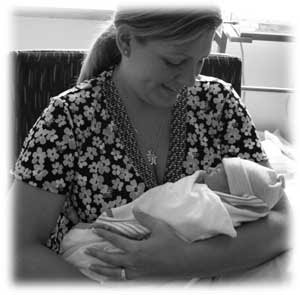
Little Luke is Here!
Our son, Luke, was born on Thursday, July 30th. He joins our wonderful family - mommy, daddy, BIG sister Michaela (3 yrs. old), and our two dogs, Koda and LuLu. Thank you for all your kinds wishes, prayers, and thoughts!
Blogger: Setting Up Your Comments
Many customers have asked where they can change the settings for Comments. Login to your account. From the Dashboard (under the blog you want to work with), click on Settings. Then click on Comments. Here is where you can change all the settings. Popular...
Typepad: Setting Up Your Comments
Many customers have asked where they can change the settings for Comments. Login to your account. Click on your Weblog from the Dashboard. Click on the Configure tab. Then click on Feedback. Here is all the options you can set or remove for allowing/disallowing...
Baby is on the way….Going to the Hospital!
Just wanted to let you all know that the baby is coming...I'm heading the hospital. Wish me luck!
Error: No feed found.
Please go to the Instagram Feed settings page to create a feed.