
Blog
Keep visiting this page to view the latest posts!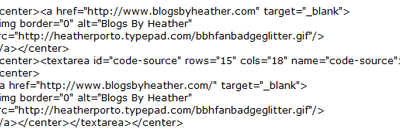
Creating a Grab My Button Sidebar Gadget
With new formatting, it's hard to share HTML code inside a post at times, so I saved the code documented in this post as an image (you'll see below in Modifying and Understanding the Code), and you may also download the code in this text file here. The first...

Clickable Banners in Constant Contact, MailChimp….in your Newsletters!
I don't know why I had never tried this before, but when doing Catherine Pooler's newsletter recently, I saw the banner on her blog, www.catherinepooler.com, and absolutely loved it and wanted to make it work in her newsletter. And it worked!!!! I'm very...

Blogger has two new Features!!! Popular Posts and Blog Stats!
While working in a customer's blog setup today I notice two new features: Popular Posts - Shows a thumbnail and snippet of your follower's favorites! Blog Stats - Shows a live number of page views (counter). To add them, Simply go to Design from your...

Inserting a YouTube Video into your posts
Whether you are a Stampin' Up! demonstrator or not, you still may like to know how to insert YouTube into your blog posts. It is now even easier than in the past! Find your video or a video you would like to feature (from YouTube), like the one I have below...
More on Transfering from Blogger to Typepad (Typepad’s Response)
In response to the problem discussed yesterday, Typepad came up with a solution I will test for us. Hopefully it works and I can then design new Blog Transfer packages based on the time needed to transfer x amount of posts at a time (by 100 post increments). Let's...
Blogger to Typepad Transfer No Longer Working Well (limited posts transfer)
Okay, while working on a couple of transfers lately, we noticed that not all the posts transferred. After researching the problem in a few Blogger Help forums and threads and reading more information here, it appears that Blogger now has some type of Auto Pagination...
For SU Demos with DBWS Stamping Blog: Twitter / Facebook Connection
For those SU Demonstrators using the DBWS Stampin Blog and want to also have their posts go to their Twitter and Facebook accounts automatically here are the instructions. Connecting Facebook Go to DBWS, then Blog Manager. Click on Preferences. Under Facebook Settings...
Featuring: Patty Bennett (www.PattyStamps.com) – Creat Your Own Blog Banner
Many of you are Stampin' Up! demonstrators but many of you are not. In either case, Stampin' Up! sells My Digital Studio (MDS) where you can create Digital Cards, Scrapbook Pages, but also your own custom banner!!! One, fabulous Demonstrator, Patty Bennett of...
Adding the Facebook Like Box to your Blog’s Sidebar
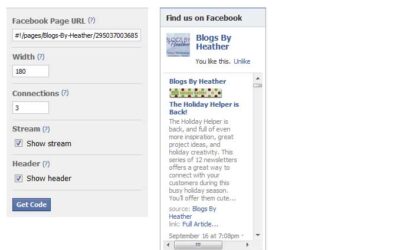
Login in to Facebook. First, you will need the URL address of your business "page" Go to the Account dropdown (upper right) and click Manage Pages. Then when you see the page you want, cick on Go To Page. Then notice the URL/address bar and copy that URL...

The Holiday Helper is Back!
Every year Stampin' Up! demonstrator Debbie McNeill of CraftyPerson Production, along with many featured artists, put together this wonderful service for us, as Stampin' Up! demonstrators to share with our customers. It is 12 newsletters to be delivered...
Typepad: Adding a Sidebar Header w/o Using a Typelist
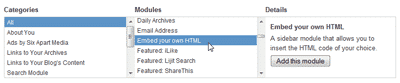
There may be times that you want to quickly add HTML to your Typepad blog's sidebar and don't want to go through the steps in setting up and publishing a new Typelist. This may be HTML code a sponsor sends you to put their badge on your site, or maybe you did...
Feedburner: How do I change my delivery time?
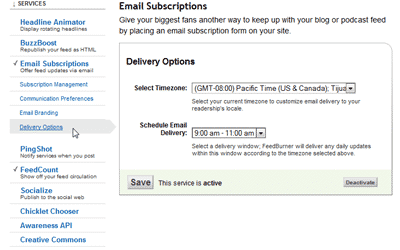
Many of my customers have asked me "how do I change when subscribers get my updates?" So I thought I'd share it with all of you too! These instructions apply to Feedburner. Go to your Feedburner account, http://feedburner.google.com, and login....
Want to know how to get your posts to automatically post to your Facebook Page?
If YES, then sign up for my newsletter. Newsletter subscribers get the new,desired tutorials at least a month before it is posted to my blog...so be sure you sign up! Also, those joining my newsletter will get an additional chance to win a free copy of my book!
Typepad: Back-dating a Post
Transfering from Blogger to Typepad While helping someone recently with their blog transfer (from Blogger to Typepad), we first ran into a small dilema where all her posts did not transfer for some reason. These non-transferred posts were from late 2009 to...

A little on Google Analytics
Here's a little excerpt from Chapter 4 in my book.... Google Analytics is a free enterprise-like solution, with a lot of powerful, custom reports and easy to use interface in following visitor activity. In trying to find ways to improve your blog following, and...
Editing Constant Contact Newsletter Template
I have had the pleasure of designing Constant Contact newsletter templates for many of you, many of which are Stampin' Up! demonstrators. However, after I design a template for you, many have asked "How do I edit it?" so I wanted to address that...
On Vacation!
We are on vacation for a week! Just wanted to quickly share that in case some of you try and contact me or have contacted me recently. I frantically tried to catch up on email and outstanding projects, so I didn't get to all the new, incoming emails. I do...
Undo in Typepad
I bet you a few of you have been driving yourself crazy trying to figure out how to "undo" something. In many applications there is an "undo" button or the CTRL + Z. However, in Typepad, I find the CTRL + ALT + Z key is the Undo (Windows/PC).
For WordPress Bloggers…a book for you too!
Nope, I have not written this one, but another author from Apress.com has! Just published in June 2010 by Stephanie Leary. Just wanted to share this with all the WordPress followers - I think about you guys as well! Beginning WordPress 3...
And the 1st winner is of my new Book (Beginning Google Blogger) is….
Using www.Random.org, the number 4 was generated (receipt below). The 1st winner of my free Beginning Google Blogger book is Jerri Ann Holdaway Congratulations Jerri! I will be contacting you by email to send you your special gift! Random Integer Generator Here are...
Error: No feed found.
Please go to the Instagram Feed settings page to create a feed.