by Amy | Nov 13, 2010 | Did You Know, HOW TO: Typepad
Recently I contacted Typepad support as I recently have been getting inundated with a bunch of spam in my comments. It was getting so bad that I had to go into my account several times a day to delete them or mark them as spam. So I contacted Typepad...
by Amy | Oct 24, 2010 | Did You Know, HOW TO: Blogger, HOW TO: Typepad
Transfer Posts Only I wanted to follow up about a recent article regarding the transfer from Blogger to Typepad. To recap, you used to transfer your Blogger posts to Typepad in one shot. However, when working recently with Sage Kimble, I found that only a...
by Amy | Oct 13, 2010 | HOW TO: Blogger, HOW TO: Typepad, HOW TO: WordPress, HTML Help
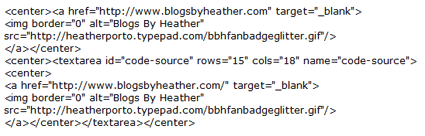
With new formatting, it's hard to share HTML code inside a post at times, so I saved the code documented in this post as an image (you'll see below in Modifying and Understanding the Code), and you may also download the code in this text file here. The first...

by Amy | Sep 30, 2010 | Did You Know, HOW TO: Blogger, HOW TO: Typepad, HOW TO: WordPress, SU DEMOS: Buttons
Whether you are a Stampin' Up! demonstrator or not, you still may like to know how to insert YouTube into your blog posts. It is now even easier than in the past! Find your video or a video you would like to feature (from YouTube), like the one I have below...

by Amy | Sep 21, 2010 | HOW TO: Blogger, HOW TO: Typepad, HOW TO: WordPress, SU DEMOS: Buttons
Login in to Facebook. First, you will need the URL address of your business "page" Go to the Account dropdown (upper right) and click Manage Pages. Then when you see the page you want, cick on Go To Page. Then notice the URL/address bar and copy that URL...
by Amy | Sep 15, 2010 | HOW TO: Typepad, SU DEMOS: Buttons
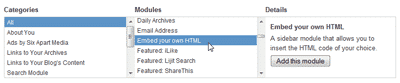
There may be times that you want to quickly add HTML to your Typepad blog's sidebar and don't want to go through the steps in setting up and publishing a new Typelist. This may be HTML code a sponsor sends you to put their badge on your site, or maybe you did...
