
Blog
Keep visiting this page to view the latest posts!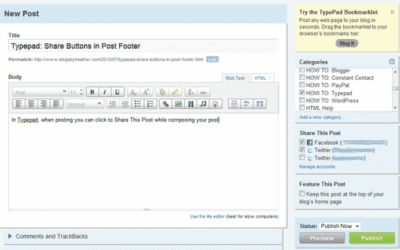
Typepad: Share Buttons in Post Footer
In Typepad, when posting you can click to Share This Post while composing your post (as shown here, in the right sidebar), however that is setup by clicking Account and then Other Accounts, and then connecting to your existing Facebook and Twitter accounts for...

More Share Buttons in Blogger
Blogger now allows you to "share" your post easily and quickly: Mail, Blogger, Twitter, Facebook, Google Buzz. This is a wonderful tool and eliminates the need for you to have to modify HTML code It's very easy to setup and you may receive an alert about...

Two ways to win your FREE copy of my book (Beginning Google Blogger)
Here it the first.... Many of you have followed my for a while (thank you!) and know my work, my expertise, and what I write posts about, so with that in mind, what do you think my next book will be about? Post your answer in a comment on this post only (one guess per...
I’m Published! I wrote a book on Blogger!
Beginning Google Blogger Are you interested in starting a blog but can’t decide on which service to use? Google’s Blogger offers many advantages over other blog publishing systems, including seamless integration with Google services and web applications. Beginning...
Move from Ning to Grou.ps (Social Networking Sites)
Many people have used Ning and have set up their Ning design to match their blogs. Michelle can do the same thing for you with Ning or Grou.ps (although Ning will now charge $19.95 a month for that type of customization).My partner, Michelle Laycock, is sharing...

New Blog Setup for Diary of a Devotional Diva
Kristan Jones contacted me asking for a blog setup for her new blog, Diary of a Devotional Diva. She sent me her original logo to use and then also stated she liked purple and swirls and liked the look of Paula's blog (Paula Luvs 2 Stamp). Original...

Quick Note….Michaela’s Birthday (4th)
Hi there!Just a quick note that today, my beautiful, sweet daughter MIchaela turns 4. So we have a busy weekend of fun and partying!!! I'll be checking email, but if I am delayed in replying over the weekend, I'm just enjoying family time 😀

Blogger: Use the Font from you Banner Designs in your Blog!!!!!
In following with thoughts from the previous post, with the wonderful instructions from Kevin and Amanda and the ability to use any font (to convert to a flash file) in your Blogger blog, now when Michelle Laycock, for example, designs your Blog Banner, you can use...
Blogger: Using Cute Fonts in your Blog Titles and Sidebar Headings
Many people are tired of the same set of fonts provided by Blogger and Typepad. Typepad has a new kit called TypeKit, which I will discuss in a separate post. For Blogger users, Kevin and Amanda (www.kevinandamanda.com) have lots of free, fun fonts for download, and...

BLOGGER: Adding the Twitter Retweet Button to the bottom of your Posts
I love when people leave comments! In a recent comment to the "Adding the Facebook Like Button" post, a reader asked if I could explain how to do the same thing but with Twitter's Retweet button. So here we go... First, go to the Dashboard, then...

Premade Banners Availabe at Midnight (Central Time) by Michelle Laycock
My partner, Michelle Laycock from Laycock Designs, is having a Premade Extravaganza Banner/Graphics Sale starting at Midnight (Central time). Don't miss this great opportunity! Here are the details....enjoy and I hope you find something you like...but...
New Newsletter Template Design for FGI
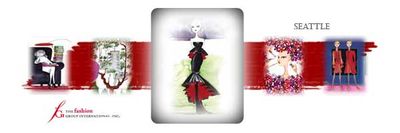
Sydney from the FGI (The Fashion Group International), contacted me about creating a newsletter template for their Seattle Branch.Here is the banner I designed for their newsletter. She mentioned she wanted it to be black, gray, and white. However, we chose red as an...
Great News for Blogger Bloggers – New Template Designer!!!!
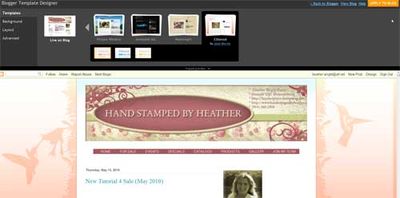
OMG!!!!!! If you use Blogger, you have to check out the new Template Designer. I am super excited to bring this news to you and will be posting a lot more detail shortly, detailing the new feature. However, I just wanted to tell you to go take a look if you...
Personal Note: Death in Family….in case there is a delay in my replying to email or comments
Hi there!I just wanted to let you know that my grandmother has passed away (yesterday). Thursday is her wake and Friday is her funeral, so I will not be around much on those days. I just wanted to share this with you in the event you have emailed me and I am...
New “Contempo” Fluid Design For Renee Blodgett
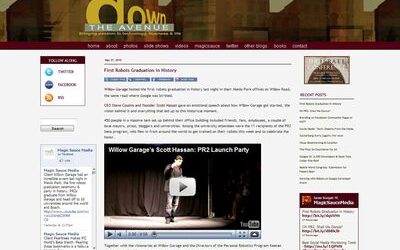
I recently revamped Renee Blodgett's "Down The Avenue" blog, www.downtheavenue.com (Typepad) with the help of Mitch Confer and Michelle Laycock. Mitch designed the new banner and logo, Michelle converted it to a fluid layout. I installed it and adjusted...

BLOGGER: Updated Instructions for Facebook Like Button
Just wanted to let you know I updated the original Blogger instructions for adding the Facebook Like button:Click here to view Updated PostWhen I copied and pasted the original code into the post, Typepad formatted the code and therefore caused problems for people...
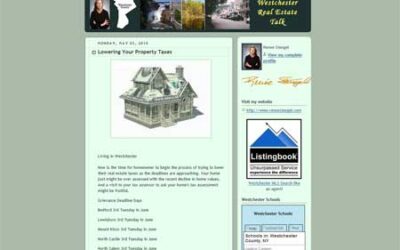
New Blog Setup for Westchester Real Estate Talk
Although the majority of my customers are Stampin' Up! demonstrators, I do welcome business from any field. Renee Stengel contacted me to create a new blog for her real estate business. Actually it is a blog makeover where the old blog was in Blogger and the new...
Cool Gadget to Add to Your Blog: Visitor Count as well as Stats
While working on a new client's blog, http://westchesterrealestatetalk.typepad.com, she asked me to add this widget to her blog and it was very, very easy to install and pretty cool so I wanted to share it with you!Visit: http://whos.amung.us/It's a gadget...
TYPEPAD: Adding the Facebook Like Button (thumbs up) to your Posts
Many customers and readers want to know how to add the new Facebook LIke Button to their blog posts. Typepad has shared this quick install on their help page.How to add Facebook Like to your posts Design > Content > Post footer module. Hit the Post footer...
Error: No feed found.
Please go to the Instagram Feed settings page to create a feed.