
Blog
Keep visiting this page to view the latest posts!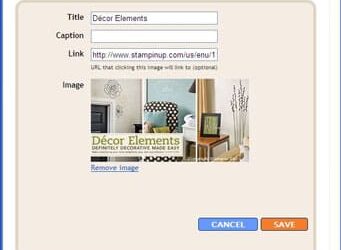
Blogger: Adding an Image and Link in the Sidebar
Many people have asked me how to add the image of the catalog and link to my sidebar (on my personal website: http://www.handstampedbyheather.com). Here are step-by-step instructions but feel free to ask me for help if you have any trouble. Login to Blogger. From the...

HTML Help
For those of you who are working on your blogs and wanting to experiment with HTML on your own, here is a helpful site I came across: www.w3schools.com. For a direct link to HTML 4.0 Reference: http://www.w3schools.com/tags/default.asp Hope this helps!

Typepad: Checking Status
To check the status of Typepad or a list of problems they are currently working on, visit this site: http://status.sixapart.com/ Best Wishes,
Typepad: SiteMeter Problem
TypePad BlogsUpdate 7:15PM PDT: The Sitemeter script is causing the error in Internet Explorer. If you remove the Sitemeter widget or script from your blog, the blog will load correctly in Internet Explorer. 6:50 PM PDT: Currently, blogs are crashing in Internet...

Typepad: Using Categories and Displaying the List on the Sidebar
When creating a post, there is the ability to add one or more categories. See my tutorial about composing a post: http://heatherporto.typepad.com/blogs_by_heather/2008/07/login-to-your-t.html The important thing to remember is to give your posts a Category -...

Blogger: Using Categories and Display Them in the Sidebar
When creating a post, there is the ability to add one or more labels (which are considered "categories"). See my tutorial about creating a post: https://www.blogsbyheather.com/2008/07/how-to-create-a.html For example, you just created a birthday card...
Did You Know…Need Copyright on Finished Artwork
I was asked today whether or not we could include Stampin' Up! product in our blog banners. I called Stampin' Up! Demonstrator Support (DS) to see what their policy was on this. For example, I created a blog banner for a fellow demonstrator, Ruth Baldwin,...
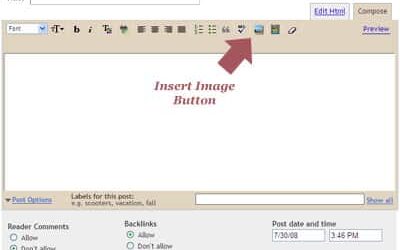
Blogger: How To Create a New Post With or Without an Image
Login to your Blogger account. From the Dashboard screen, on the left side you’ll see a green plus sign with "New Post" next to it. Click that button to directly go to creating a new post. The next thing you will see is the screen image above where you will...

Blogger’s Resource List
The following is a blogger's resource list that was composed by myself and fellow demonstrators at SUDSOL (www.SUDSOL.org). I've posted this list to allow you to quickly access all your blogging needs from one central point - my new blog, Blogs By Heather!...

Adding a PayPal Button to your Post
The following are brief instructions on how to successfully add a PayPal button to your Blogger or Typepad blog. Login to your account and create/compose a new post. Complete the rest of the post until the last thing you will do is place the PayPal button. Click the...

Constant Contact Newsletter Design
Constant Contact Newsletter Design Templates are designed to coordinate with your existing website or blog; similar images, color scheme, buttons. If you don't have a site, that's okay, we can design a newsletter from scratch using the color scheme and thoughts you...

Blog Setup Service
Although this service was again originally designed for Stampin' Up! Demonstrators, it can be modified to help assist other business types with their specific setup needs. Please contact me with a list of your specifications and I'd be more than happy to provide a...
Did You Know…Gallery for Blogger
Did you know that it is very easy to display a Gallery for Blogger. While Typepad has a built-in Gallery feature, Blogger now has Picasa Web Albums (http://picasaweb.google.com). If you login to your Blogger account and Go to the Dashboard, on the right side...
Did You Know…Typepad vs. Blogger
Did you know that if you wanted to create this blog (which is a Typepad blog), you would have to pay $14.95 a month! Where if you look at my very similar Hand Stamped By Heather blog (http://www.handstampedbyheather.com), that is a Blogger blog and is FREE! In...
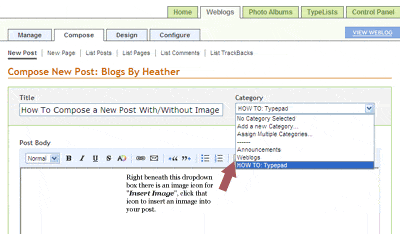
Typepad: How To Compose a New Post With/Without an Image
Login to your Typepad account and from the Home page, next to your weblog, click the "Begin a New Post" button. Another Window will appear "Compose New Post: <your weblog name>" as shown in the image above. First, click the "Customize...

Welcome to Blogs By Heather!
Owning a blog is an essential tool and asset to any business, and the fundamental component in building your online presence and social marketing strategies. Blogs by Heather is a site full of free how-to articles and more!
Error: No feed found.
Please go to the Instagram Feed settings page to create a feed.