
Blog
Keep visiting this page to view the latest posts!
SEO: How do I get people to find me on the web? (Round-up)
In the recent article series "How do I get people to find me on the web?" we addressed many techinques on how to use your blog to increase your online exposure and improve your search engine rank. I shared with you tips I had learned from Rich Brooks,...
SEO: How do I get people to find me on the web? (Part 3 of 3)
How do I improve my search engine rank? How do people find me on the web? How to do I get new customers? How do I get people to visit my site? In reviewing a video from Rich Brooks of FlyteBlog.com, here is what I have summarized from his presentation on how to...

Custom Facebook Pages and Cover Images
IMPORTANT NOTE: With Facebook changes and the new TimeLine format, you can no longer set a "landing page" in Facebook. You can still have a custom page like those featured here, but it cannot be the first thing they see. Please read this full article on the...
SEO: How do I get people to find me on the web? (Part 2 of 3)
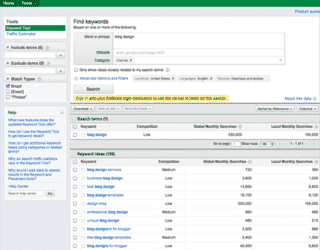
How do I improve my search engine rank? How do people find me on the web? How to do I get new customers? How do I get people to visit my site? In following our previous conversation on how to get people to find you on the web, in this post we'll discuss On Page...
SEO: How do I get people to find me on the web?
How do I improve my search engine rank? How do people find me on the web? How to do I get new customers? How do I get people to visit my site? These are amongst the most popular questions I get from customers, especially those who have just started a blog. In...

Small Biz Success Summit by Social Media Examiner
If you're a small business owner, which many of us here are, then you have to jump on this opportunity to receive top-knotch, no nonsense advice from 25 of the top social media small business professionals! Learn from the best how to best use social media...
State of the Blogosphere (BlogWorldExpo)
A long time customer of mine, Renee Blodgett, Down the Avenue (www.DownTheAvenue.com), attened the BlogWorldExpo and shares Shani Higgins' (CEO of Technorati) thoughts on the state of the blogosphere. I think what makes me smile the most is that 44% of...

Paint.Net FREE Photo Editor
I am blessed to have many great business associates and partners. Amy Celona of Webs By Amy (www.WebsByAmy.com) is one of them who specializes in WordPress, WordPress hosting, and graphic design. Here is her portfolio and testimonials. She also shares a lot with...
We have power back!
Hi there! Thanks for your patience. Our power was restored and we're back in business 😀 However, I'm very sick 🙁 so I'm not on the computer much regarding email, just to work. Hope to be better in the next day or so 😀 Today, the SU...
Q&A: How do you change “Comments” to read “Testimonials”
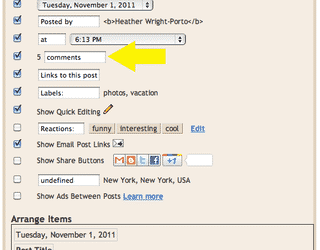
Bloggers welcome comments and I'm sure as a blogger you leave comments on other blogs. Typically, you find the word "Comments" in the post footer area and click on it to then enter a comment form area. In Typepad, in the Post Footer area you see...
Power Out in NY
Hi there! Yesterday was my sister's baby shower and there was a big snow storm to pass through the area. We did it and she had a great time with family and friends. However, we lost power about 10PM last night so I will have limited access to the computer. I'm...

One last note before my newsletter goes out…
Hi there! Before moving onto more blogging topics and questions/answers, I just wanted to make mention once more that my next newsletter issue (free email newsletter) is going out soon and will be featuring tools on how to create custom Facebook pages, Facebook...
Creating a Custom Facebook Page
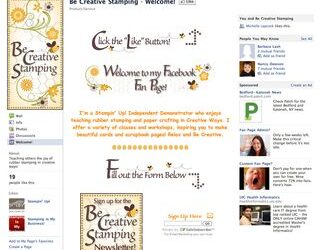
My partner, Michelle Laycock, are now offering a new, affordable service where we can create pages like these for you! Michelle created for Tammy Shaia's where you see a custom Facebook page. I created the one for Sandi MacIver which features what is known as a...
Q&A: How do pages work?
I'm having fun going through a bunch of questions being posted on my blog in individual posts as well as those posted in the Q&A area. I will get to all of them and now answer them individually for better SEO results (so I can put each question in the...
Q&A: If I change my blog platform will I lose my subscribers?
At some point during your blogging experience or growth, you may consider changing blog platforms, moving to say Blogger to WordPress or Blogger to Typepad and vice versa. The question is what happens to your current blog subscribers? Do they get...
Q&A: Do “hidden” pages show up in blog feed (to subscribers)
After posting the 3-Part Series on Membership sites there was a question about whether or not blog subscribers would be updated when a hidden or protected page was published. It's a great question! Question/Comment: Thank you Heather. I've enjoyed this...

3-Part Series: Membership Sites using Password Protected Pages or Blogs
Hi again! I've been meaning to get this article out to you sooner, but the Google Sites problem had me backed up a few days. Glad that is all resolved! 😀 Then I had to do my monthly maintenance updates for Stampin' Up! demonstrators and such. Thanks...
Google Sites Problem Now Fixed 😀
Yeah!!!!! Just wanted to let you know, especially Blogger users as they are the ones most affected by the issue over the last few days, that the Google Sites issue is now fixed. I can now see blog graphics on Safari and FireFox on the Mac and FireFox and Internet...
Terms of Service (Maintenance Customers)
IMPORTANT NOTE: Legal Terms Intellectual Property If you subscribe to either my Newsletter or Blog Maintenance service, you agree and accept to these legal terms: that if you cancel this maintenance program, you allow me access to your blog/newsletter to...
Blogger Issue with Google Sites Getting Fixed
Yea!!!! It appears to be working again....on Safari (Mac). I though tit was all fixed but so far not on all browsers....but since I can now see it on Safari although I could NOT earlier today, I think they are "on it" and fixing it. NOTE: The problem has...
Error: No feed found.
Please go to the Instagram Feed settings page to create a feed.