
Blog
Keep visiting this page to view the latest posts!
101 Blogging Tips: Tip #52 (Add a Search Box)
I'm excited to share this series with you, called "101 Blogging Tips". In the series there will be 101 blogging tips that you can begin applying to your blog today! Don't wait, get started now! Tip #52: Add a Search Box Having a search box allows...
101 Blogging Tips: Tip #51 (Set Posts Per Page)
I'm excited to share this series with you, called "101 Blogging Tips". In the series there will be 101 blogging tips that you can begin applying to your blog today! Don't wait, get started now! Tip #51: Set the Number of Posts to Show on Home Page...
101 Blogging Tips: Tip #50 (Use Feature a Post)
I'm excited to share this series with you, called "101 Blogging Tips". In the series there will be 101 blogging tips that you can begin applying to your blog today! Don't wait, get started now! Tip #50: Use the "Feature This Post" We've...
101 Blogging Tips: Tip #49 (Note About Affiliates)
I'm excited to share this series with you, called "101 Blogging Tips". In the series there will be 101 blogging tips that you can begin applying to your blog today! Don't wait, get started now! Tip #49: Note That You Are an Affiliate If you are an...
101 Blogging Tips: Tip #48 (Add a Sitemap!)
I'm excited to share this series with you, called "101 Blogging Tips". In the series there will be 101 blogging tips that you can begin applying to your blog today! Don't wait, get started now! Tip #48: Add a Sitemap Sitemaps make it easier for...
101 Blogging Tips: Tip #47 (Spread Yourself Out but Not Too Thin)
I'm excited to share this series with you, called "101 Blogging Tips". In the series there will be 101 blogging tips that you can begin applying to your blog today! Don't wait, get started now! Tip #47: Spread Yourself Out but Not Too Thin This is a...
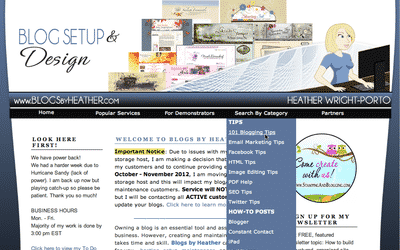
New Dropdown Menu! Easier to find what you’re looking for here at Blogs By Heather
Click to view larger image. New changes to Blogs By Heather. I am in the process of restructuring and as part of that is a new and improved website look! Recently I changed the overall design with a new banner and background, but now I've added a...

I want a blog like Mary Fish – Interlinking (SEO Technique) Newsletter Article
Will be going out this upcoming week! Thanks for your patience but it will be worth it! Those who have subscribed to my newsletter know that my newsletters are detailed and "full" of great instruction and tips. You won't want to miss this one! To learn...
Power Back and INK-credible Promo Button for SU Demos (US, CAN, UK, AUS)
Power is back ON! Thank you for your patience as I had lost power for a while from Hurricane Sandy. Power (and internet connection) seems to be stable now and I'm back to work. The setups I had scheduled for this week will be done within a few business days...
Hurricane Sandy Update
Hi! Just wanted to drop a quick note to say that we still don't have power. So my scheduled posts have gone out and I hope to have more in a day or so. But for those customers trying to contact me, I am getting email and internet via my phone but...

101 Blogging Tips: Tip #46 (Learn Basic HTML)
I'm excited to share this series with you, called "101 Blogging Tips". In the series there will be 101 blogging tips that you can begin applying to your blog today! Don't wait, get started now! Tip #46: Learn Basic HTML There is so much more...
101 Blogging Tips: Tip #45 (Where is your important info? Easy to Find?)
I'm excited to share this series with you, called "101 Blogging Tips". In the series there will be 101 blogging tips that you can begin applying to your blog today! Don't wait, get started now! Tip #45: Make it easy to find imporant information on...

SU Demos: Single Stamps PDF and Promo Button
Many have asked for this button as well and the PDFs combine all FIVE PDFs into ONE making it easy for you and your customers to view all the new Single Stamps. Stampin' Up! is trying something new! It is called Single Stamps. You can purchase...
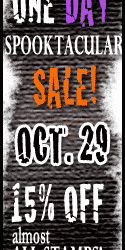
SU Demos: October 29th Promo Buttons (US and CAN)
Since we are expecting a big storm (Hurrican Sandy), I did the updates today for October 29th (Monday) as I'm not sure if I will have an internet connection or not tomorrow. So again, the updates were done today for the October 29th one day sale for Stampin'...

6 Tips for Creating DIY Video
Good morning bloggers! Today, I have a special treat for you. Derek Singleton of Software Advice, is a guest author who prepared this article specifically for you here at Blogs By Heather! It is a how-to article on creating a DIY video, which so many of us do,...
101 Blogging Tips: Tip #44 (Add a Poll)
I'm excited to share this new series with you, called "101 Blogging Tips". In the series there will be 101 blogging tips that you can begin applying to your blog today! Don't wait, get started now! Tip #44: Use polls to get feedback In a previous...

How to use GIMP to edit images for your blog
In the 101 Blogging Tips series we've discussed images and specifically image size. You can use GIMP, a free image editor to resize your images. Sandi and I are super excited to tell you about another new feature at Stamping and Blogging! We now have what...

What is your blog’s feed address?
As a follow up yesterday's article on claiming your blog with Technorati, here is how you can determine what your blog's feed address (URL) is. Blogger Users For blogger, it is your site address, then the addition of /feeds/posts/default a the end. My...
101 Blogging Tips: Tip #43 (Claim Your Blog)
I'm excited to share this new series with you, called "101 Blogging Tips". In the series there will be 101 blogging tips that you can begin applying to your blog today! Don't wait, get started now! Tip #43: Claim Your Blog at Technorati Technorati is...
101 Blogging Tips: Tip #42: Open Your Comments
I'm excited to share this new series with you, called "101 Blogging Tips". In the series there will be 101 blogging tips that you can begin applying to your blog today! Don't wait, get started now! Tip #42: Open Up Your Comments This is a popular...
Error: No feed found.
Please go to the Instagram Feed settings page to create a feed.