
Blog
Keep visiting this page to view the latest posts!
Add Feedburner As a Widget (Blogger and Typepad)
When creating a blog, one of the most important things that's on your mind and what you want to do is get new subscribers! FeedBlitz and Feedburner are two of the most popular ways to manage your subscriptions. I have used both and don't have any...

Adding a Watermark to an Image
Many people add a watermark to their artwork/images so people can't easily copy them, but also because Stampin' Up! requires a copyright to be on their images (which are used in demonstrator's samples). Here are some basic instructions: Open your artwork file. Open...

Creating PDFs for FREE
A fellow dmonstrator from the SUDSOL group asked today how to create PDFs for free for her MS Word documents. I found this nice tool, www.primopdf.com (and it converts MS Word documents as well as Excel, PowerPoint and many others)! Best of all it is FREE! Once...

RGB and HTML Color Codes for Stampin’ Up!
Hi fellow bloggers! Since many of you are Stampin' Up! demonstrators, I wanted you to have a place to link to in order for you and your customers to view the RGB and HTML codes for the Stampin' Up! colors! It was not created by me though - I just uploaded it to...

Blogger: Using Picasa Web Albums
If you are using Blogger and would like a Gallery on your page, you can use Picasa Web Albums for free! It is very easy to use. Here are some basic instructions to help you get started. When you login to Blogger, go to the bottom and under Tools and Resources...

Blogger: Customizing Template
A customer left a comment on my Blogs By Heather blog on how to customize her Blogger template and I thought I'd write a mini-tutorial on it. Since my customer is using the Son of Moto Blogger template, I chose that one to manipulate to help her specifically....

Typepad: Domain Mapping with Go Daddy
Many of my new customers have Typepad accounts (such as www.heatherporto.typepad.com) and register their domain names with Go Daddy (say www.blogsbyheather.com). Domain Mapping is a feature of Typepad which requires setup steps on Typepad as well as Go...

Blogger: Storing Files Online
One of the great features of Typepad is that there is a File Manager where you can store your PDFs, images and more. Blogger does not have this File Manager but that's okay. You can still get one for FREE. I use XDrive (an AOL Service - meaning AOL has...

Creating a hyperlink out of Text or an Image
A blog visitor asked me this question and I thought maybe other's would like to know as well: How do I link a word or picture to another blog or website? For TEXT While inside the post body Select the word or words you want where the visitor will be able to click on...

Did You Know…Using TinyURL.com
Did you know that you can easily and quickly create more manageable, tiny, hyperlinks instead of including very long paths? Meaning, instead of linking to this Typepad Article about how to create a...

Typepad: The Difference Between a Page and a Post
A fellow demonstrator has recently asked me what the difference between a Page and a Post is? Posts These are samples, artwork, announcements that you will write about daily or weekly. They display on your blog with the recent post being the first you see. These...

Blogger: Free Backgrounds
While looking at Ellie Augustin's blog I found a link to this website: http:/www.thecutestblogontheblock.com/, where you can download and use free Blogger backgrounds. Pretty cool. It is very easy and has instructions on their site how to install it. But here they...

Did You Know…You can have a 3 column format in Blogger
A few of my customers desire a 3 column layout for Blogger, like those of Typepad. I came across this great source! It has many of the popular Blogger templates (such as Minima, Thisaway, Sand Dollar, Rounders and more) in a 3 column format (left and right...

Free Online Image Resizing Tools
Hi! Some fellow SUDSOLers have shared these links with me and I thought you'd love them, especially if you don't already have an image editing program like Photoshop or Photoshop Elements. I have not used these personally but here great things about them! This online...

Typepad: Using Post Continuation/Extended Body Feature
On of my fellow demonstrators asked me, "I've seen blogs where when you click on a Category it lists a mini description of the post, then the users have to click on it to continue reading and viewing the entire post. How can I set that up?" This...
Typepad: Adding an Image to the Sidebar
The following is a mini-tutorial on how to add an image to your sidebar and then have it link to the Stampin' Up! website page (for that given special, promotion or catalog). In this example, we will use a link to the new Recruitment special. Login to Typepad....
Blogger: Alternative to Adding an Image in the Sidebar
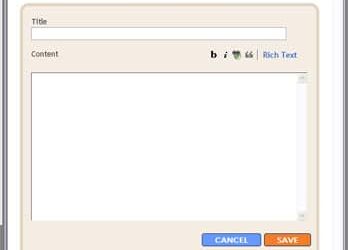
My previous post on this subject describes how to do it using a Image or Picture Page Element (https://www.blogsbyheather.com/2008/08/blogger-adding.html). This tutorial will be on how to do it using the HTML/JavaScript Page Element. This allows a little...

Did You Know…The Difference in Domain Mapping, Gripping, and Forwarding
In regards to purchasing a domain, there are a few terms to be familiar with. Here are brief discriptions of each. Please feel free to contact me if you have more questions or need more clarification. Domain Mapping Domain Gripping or Domain Masking Domain Forwarding...

Did You Know….To Keep Images Aligned In Post
In Typepad, to keep your images aligned nicely the way I have in my image editing tutorial, https://www.blogsbyheather.com/2008/08/create-image-fo.html, from the Insert Image window, go to Custom Settings and remove the checkbox from "Wrap Text". In Blogger,...
Create Image For Sidebar
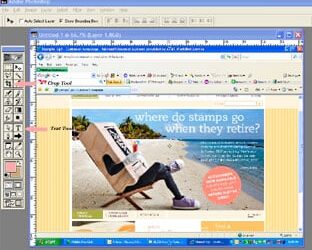
Whether you are creating a sidebar item for Typepad or Blogger, first you have to create the image you want to use (for example, a small picture of the beach scene for retiring stampsets). This is what I do in Photoshop 6.0 (and 7.0): First, while visiting the...
Error: No feed found.
Please go to the Instagram Feed settings page to create a feed.